 inbox Me
What Is Temporary Email and How Does It Work?
If you've ever seen the phrase "temp mail," "10 minute mail," or "disposable inbox" on a sign-up page, you've already brushed up against this idea: a…
 If you've ever seen the phrase "temp mail," "10 minute mail," or "disposable inbox" on a sign-up page, you've already brushed up against this idea: a temporary email address is a working inbox that exists only for as long as you need it, with no registration, password, or personal information attached. ## How a disposable inbox actually works Behind the scenes, a temp mail service like inbox Me generates a random address on a domain it controls (for example,
 [email protected]), then quietly watches that mailbox for incoming messages. When mail arrives — a confirmation link, a one-time code, a newsletter — it shows up in your browser in real time. No IMAP client, no app, no account recovery questions. 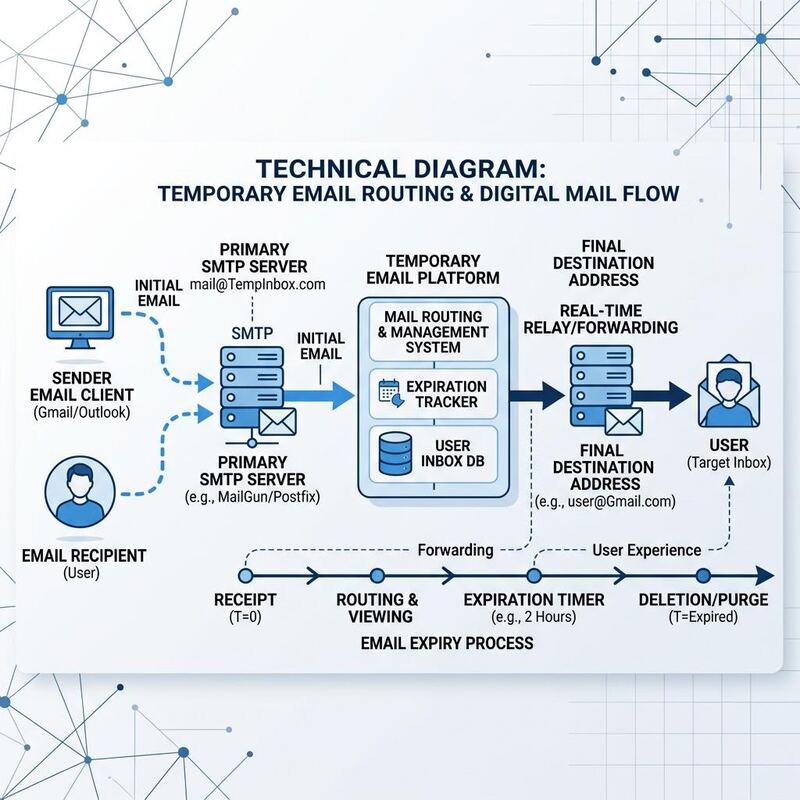 The key technical difference from a normal mailbox is lifespan. A real email account is built to persist for years. A temporary email address is built to be thrown away. Most providers, inbox Me included, purge addresses and their messages after a short window, and there is no password-reset flow to get an old one back — that's a feature, not a bug. ## What you can (and can't) do with it A temp mail inbox is receive-only on most services. You can: - Receive a signup confirmation link - Receive a one-time password (OTP) or verification code - Receive a newsletter you want to preview without committing your real address You generally can't: - Send email from the temporary address - Recover the inbox after the session ends or the address expires - Use it for accounts you'll need to log back into months later ## Why this matters for privacy
  Every time you type your real email into a form, that address becomes a small liability — it can be sold to data brokers, leaked in a breach, or simply buried under newsletters. A disposable inbox absorbs that risk instead of your primary account. It's the same logic as using a guest Wi-Fi network instead of your home one: convenient, low-risk, and easy to forget about once you're done. If you're ready to try it, generate a free temporary email address — no signup required.